Multiple Program Occurrences In Open With Popup Menu
OK, it’s not so important but it’s annoying. In some apps like vlc whenever you install an update, when you select a video file and you right click on it, you select “Open With”. Then you discover that you have multiple program occurrences equal to the updates that you have made. 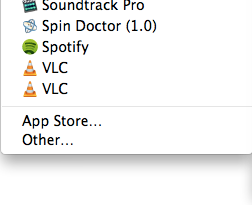 Not to install updates isn’t a solution. Due to Mr. V.K. you can open Terminal from your Utilities and execute the following command: [sourcecode]/System/Library/Frameworks/CoreServices.framework/Versions/A/Frameworks/LaunchServices.framework/Versions/A/Support/lsregister -kill -r -domain local -domain system -domain user[/sourcecode] it will rebuild launch services database and the multiple apps occurrences will disappear. It worked on my Mountain Lion.