The Recommended Size For Custom Uibarbuttonitem
Since the release of iOS 5 we have the new feature to use appearance proxy for an easy custom look for our app. So for an example by creating the well known method: [sourcecode language=“objc”] - (void)customizeAppearance { … // UIBarButtonItem UIImage *button30 = [[UIImage imageNamed:@“button_textured_30_new”] resizableImageWithCapInsets:UIEdgeInsetsMake(0, 5, 0, 5)]; [[UIBarButtonItem appearance] setBackgroundImage:button30 forState:UIControlStateNormal barMetrics:UIBarMetricsDefault]; UIImage *buttonBack30 = [[UIImage imageNamed:@“button_back_textured_30_new”] resizableImageWithCapInsets:UIEdgeInsetsMake(0, 13, 0, 5)]; [[UIBarButtonItem appearance] setBackButtonBackgroundImage:buttonBack30 forState:UIControlStateNormal barMetrics:UIBarMetricsDefault]; [[UIBarButtonItem appearance] setTitleTextAttributes:[NSDictionary dictionaryWithObjectsAndKeys:[UIColor colorWithRed:220.0/255.0 green:255.0/255.0 blue:255.0/255.0 alpha:1.0], UITextAttributeTextColor, [UIColor colorWithRed:0.0 green:0.0 blue:0.0 alpha:1.0], UITextAttributeTextShadowColor, [NSValue valueWithUIOffset:UIOffsetMake(0, -1)], UITextAttributeTextShadowOffset, [UIFont fontWithName:@“Avenir-Medium” size:0.0], UITextAttributeFont, nil] forState:UIControlStateNormal]; … } [/sourcecode] consider that we use the following images (all at @2x size)  and for the back bar button
 we can implement a custom look for UIBarButtonItems like this
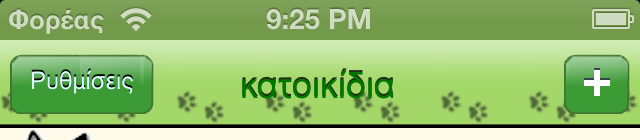 and
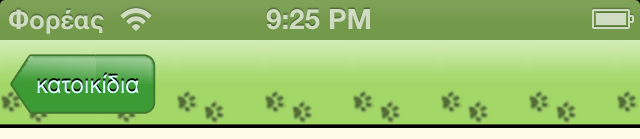 As you can see the mechanism works, but we detect some weird shades inside the body of the bar buttons. It’s not recommended for our app. The ideal would be to have a look like:
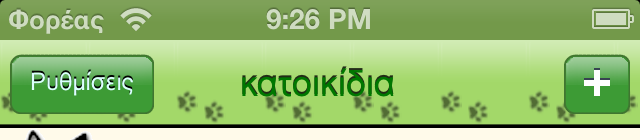
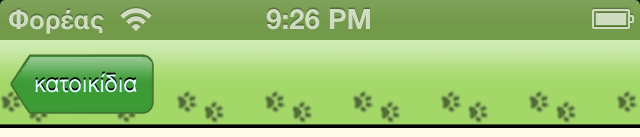 But how? The trick is in resizableImageWithCapInsets method and the initial image files. The correct technique is to have a narrow stripe repeat itself as body of the button. So we design bar buttons like:

 where the centre part is not bigger than 2 pixels. Then we choose the correct values for UIEdgeInsetsMake method and the customizeAppearance method looks like: [sourcecode language=“objc”] - (void)customizeAppearance { … // UIBarButtonItem UIImage *button30 = [[UIImage imageNamed:@“button_textured_30_new”] resizableImageWithCapInsets:UIEdgeInsetsMake(0, 5, 0, 5)]; [[UIBarButtonItem appearance] setBackgroundImage:button30 forState:UIControlStateNormal barMetrics:UIBarMetricsDefault]; UIImage *buttonBack30 = [[UIImage imageNamed:@“button_back_textured_30_new”] resizableImageWithCapInsets:UIEdgeInsetsMake(0, 10, 0, 6)]; [[UIBarButtonItem appearance] setBackButtonBackgroundImage:buttonBack30 forState:UIControlStateNormal barMetrics:UIBarMetricsDefault]; [[UIBarButtonItem appearance] setTitleTextAttributes:[NSDictionary dictionaryWithObjectsAndKeys:[UIColor colorWithRed:220.0/255.0 green:255.0/255.0 blue:255.0/255.0 alpha:1.0], UITextAttributeTextColor, [UIColor colorWithRed:0.0 green:0.0 blue:0.0 alpha:1.0], UITextAttributeTextShadowColor, [NSValue valueWithUIOffset:UIOffsetMake(0, -1)], UITextAttributeTextShadowOffset, [UIFont fontWithName:@“Avenir-Medium” size:0.0], UITextAttributeFont, nil] forState:UIControlStateNormal]; … } [/sourcecode] Enjoy!